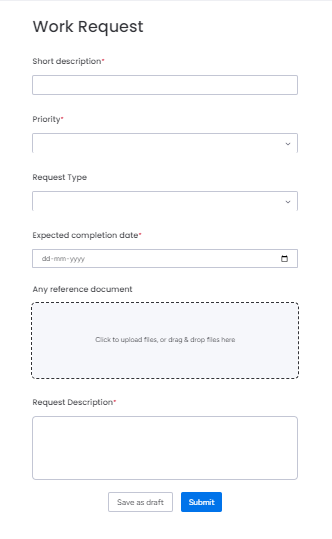
The Work Request feature enables users to submit maintenance or repair requests for an organization's assets. By filling out the Work Request Form, users can mention all the details of repair or maintenance tasks and submit the request directly to the asset manager for review and approval.
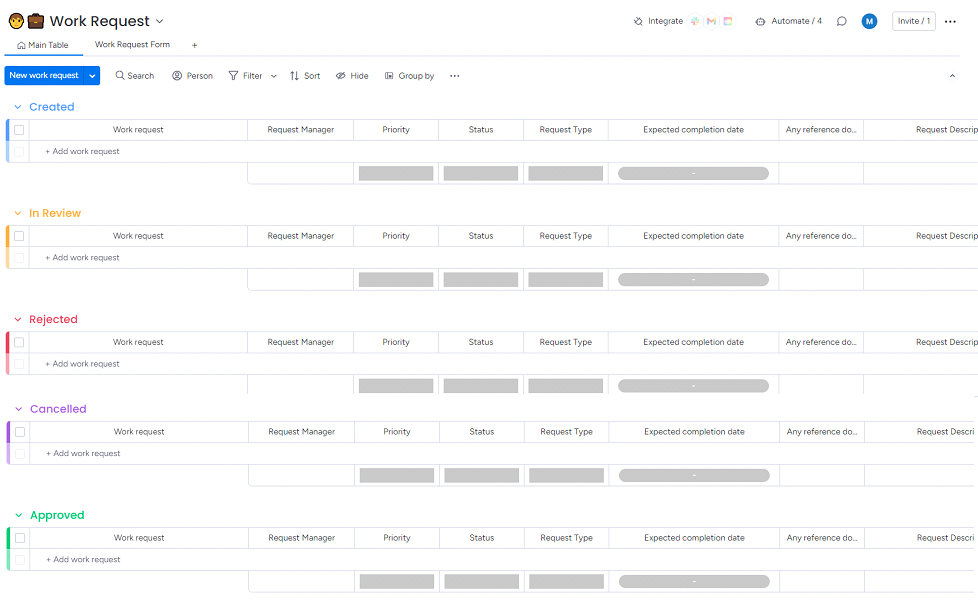
This feature includes five dedicated boards:
Created
This board provides a comprehensive overview of Work Requests, displaying key details such as Priority, Status, Request Type, Expected Completion Date, and other relevant information. Asset managers can easily monitor and manage all submitted work requests from this board.
In Review
Users can set the status of a work request to In Review while evaluating it. This board specifically displays all work requests currently under review, allowing managers to track and manage requests.
Rejected
Users can reject work requests based on the requirement. This board displays a comprehensive list of all rejected work requests with the details.
Cancelled
Users have the option to cancel work requests as needed. All canceled requests, along with their details, will be displayed and managed on this board, providing a clear record of cancellations and ensuring effective tracking.
Approved
Once the users approve work requests based on the requirements, the approved requests are automatically added to this board. Each entry includes the full details of the work request, allowing for easy tracking and management of tasks in progress.
Work Request Form
A simple form that can be filled out by employees, capturing all required information for setting up Work Orders and submitting to get approval.